
The while loop
What you'll learn:
- repeat code with a
whileloop as long as a condition is true; - predict how many times a loop body runs and what the counter holds after the loop;
- go through numbers with
forandrange, and through a string's characters withfor; - leave a loop with
break, skip a lap withcontinueand understand a loop'selsebranch.
To add up the numbers from 1 to 100, you would have to write a hundred terms in a row. Nobody does that. Repeated actions call for a loop—a construct that runs a block of code again and again.
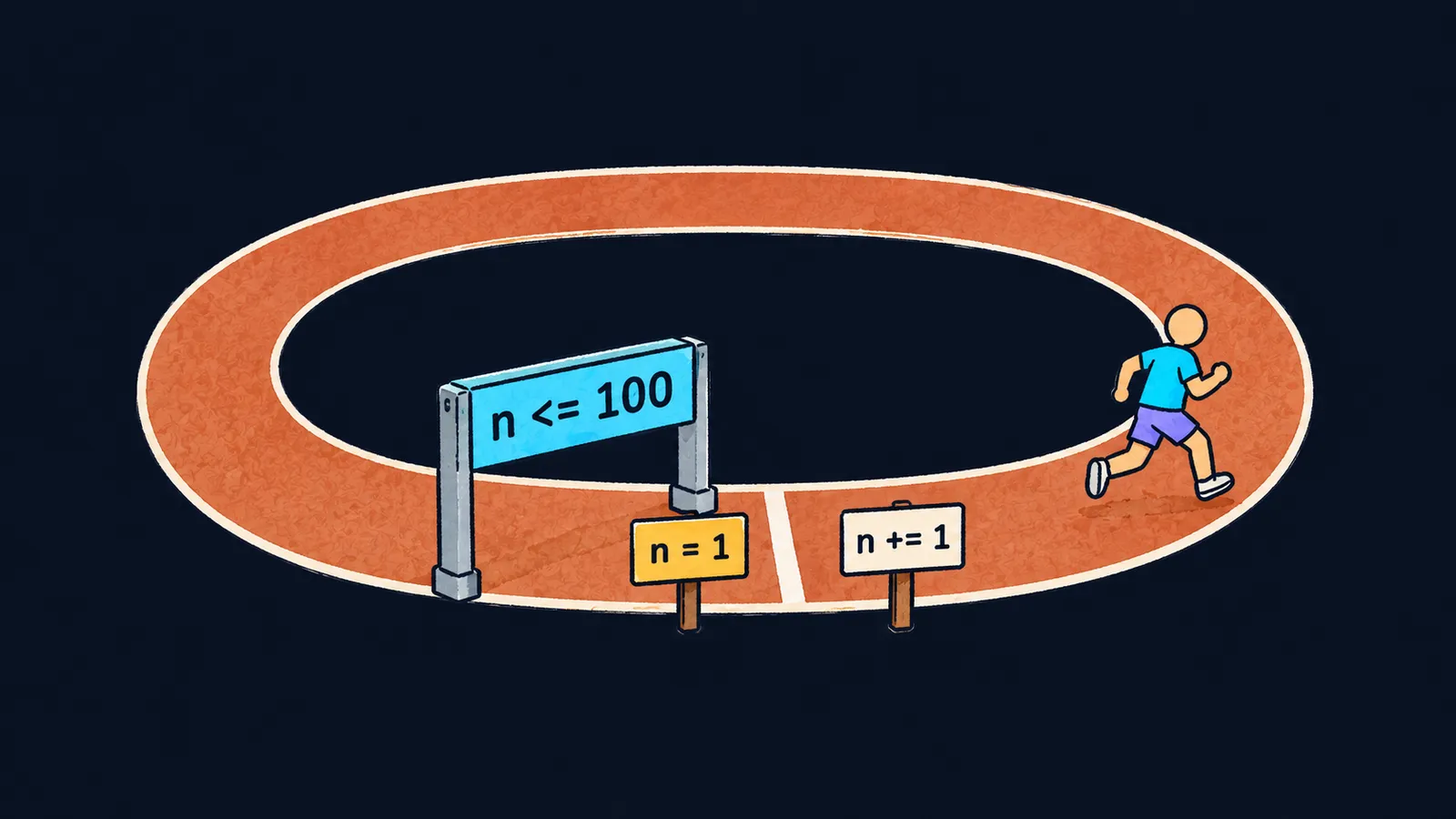
Picture a running track. At the start stands a sign, n = 1: the runner begins with the first lap. Before each lap, the runner passes a checkpoint arch, n <= 100. If the arch lets them through, they run the lap and mark it on the lap counter: n += 1.
When the arch does not let them through, the run is over, and the runner leaves the track. The while loop works the same way: it repeats its block as long as its condition is true. Here is the sum from 1 to 100:
total = 0
n = 1
while n <= 100:
    total += n
    n += 1
print(total)  # 5050
Let's walk through the program line by line:
total = 0sets up the sum.n = 1is the sign at the start: counting begins at one.while n <= 100:is the checkpoint arch before each lap.total += nadds the lap number to the sum.n += 1marks the lap on the counter.print(total)runs after the loop and prints5050.
Condition and counter
The line while n <= 100: is built like an if: a colon follows the condition, and the indented block below is the loop body. One pass through the body is called an iteration.
The most important thing about while is the order of events. Python checks the condition before each iteration, not after it. The loop ends at the moment the last change in the body makes the condition false. That is why after the loop n holds 101, not 100: the arch closed on the value 101.
Press "Next step" and watch n on the while line: the loop ends when n is 4, although the last lap was the third.
1total = 02n = 13while n <= 3:4 total += n5 n += 16print(total, n)
total = 0 sets up the sum.
Interviewers like questions of this kind: how many times does the body run, and what does the counter hold after the loop? One rule always gives the answer: the condition is checked before the lap.
Here the runner picture is inexact. A runner runs at least one lap, while while checks the condition even before the first iteration. If the condition is false from the start, the body never runs: with n = 200 the program prints 0 right away.
The step need not be one
A counter can change in any way. Writing n //= 2 means the same as n = n // 2: the number is floor-divided, and the result is stored back. This counts how many times 100 must be floor-divided by 2 to leave 1:
n = 100
steps = 0
while n > 1:
    n //= 2
    steps += 1
print(steps)  # 6
Across the iterations, n takes the values 50, 25, 12, 6, 3 and 1. When n is 1, the condition n > 1 is false, and the loop ends after six iterations.
Infinite loop
The condition of while True: is always true, so such a loop never ends by itself. This infinite loop is useful inside a function when the number of iterations needed is not known in advance. A return breaks it: it ends the function, and the loop with it. This function finds the first number whose square is greater than limit:
def first_square_over(limit):
    n = 1
    while True:
        if n * n > limit:
            return n
        n += 1


print(first_square_over(50))  # 8
Let's see what happens on the call first_square_over(50):
- The search starts at
n = 1. - For
nfrom1to7, the square is not greater than50, and the loop goes on. - When
nis8, the square is64, andreturngives back8.
Common mistake
The counter is never changed in the loop body:
i = 1
while i <= 3:  # ✗
    print(i)
The variable i stays 1, the condition is always true, and the program prints 1 forever. The runner keeps circling the track, and the lap counter never moves. On your own computer, the Ctrl+C key combination stops such a program, and the traceback ends with this line:
KeyboardInterruptIn the course exercises, the time limit stops an infinite loop, and no check results appear. Add i += 1 at the end of the body, and the loop prints 1, 2 and 3.
Key points
whilerepeats its body as long as the condition is true, and checks it before each iteration.- The loop ends when a change in the body makes the condition false: after
while n <= 100,nholds101. - If the condition is false from the start, the body never runs.
- Without a change to the counter in the body, the loop becomes infinite.
Subscribe to take the course
The course is free. Sign in with Telegram and subscribe to the channel to open every lesson.
















