
Tracebacks and kinds of errors
What you'll learn:
- read a traceback from the bottom up and find the line where the error happened;
- catch exceptions with
try/exceptand choose the order of the branches; - run code after success with
elseand in any case withfinally; - raise exceptions with
raiseand declare your own exception classes.
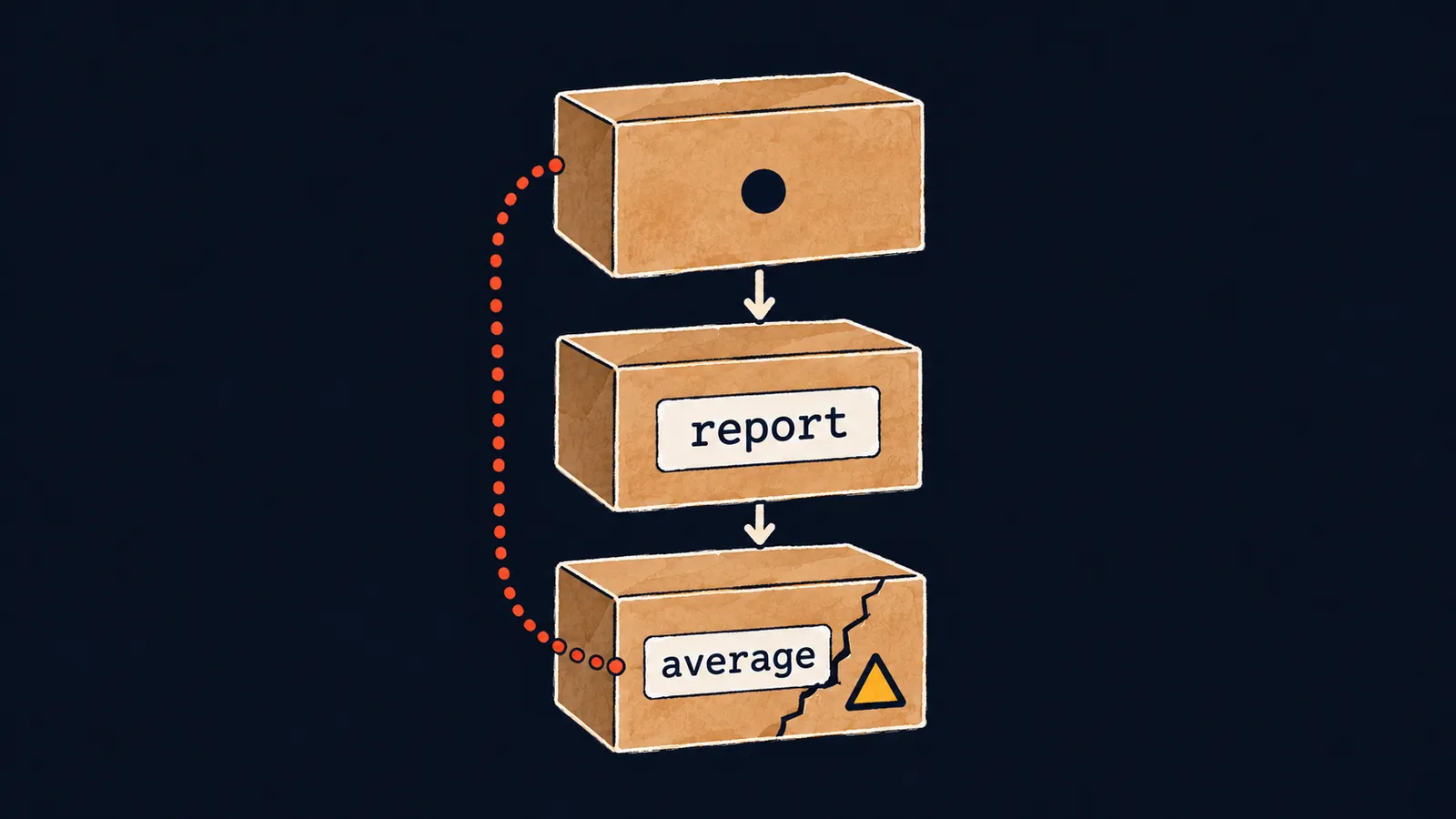
Picture a column of three boxes stacked one under another. The top box is the program's code outside functions. It hands work to the report box, which hands it to the bottom box, average. Each box waits until the one below finishes and gives back an answer.
Now the bottom box cracks: average cannot do its job. The news of the break travels along a dotted trail back up, past each box. If nobody stops it, the whole program stops.
That is how an error at run time often happens not on the line with the call but deep inside functions. The average function divides the sum of the numbers by their count, which for an empty list means dividing by zero:
def average(nums):
    return sum(nums) / len(nums)


def report(nums):
    print("average:", average(nums))


report([4, 6])  # average: 5.0
report([])Traceback (most recent call last):
File "main.py", line 10, in <module>
report([])
File "main.py", line 6, in report
print("average:", average(nums))
^^^^^^^^^^^^^
File "main.py", line 2, in average
return sum(nums) / len(nums)
~~~~~~~~~~^~~~~~~~~~~
ZeroDivisionError: division by zeroLet's walk through what happened:
- The call
report([4, 6])works:averagereturns5.0, and the program printsaverage: 5.0. - The call
report([])passes an empty list toreport, which passes it toaverage. - In
average,len(nums)is0, and the division by zero breaks the work. - Neither
averagenorreporthandles the error, so the program stops and prints a report.
Reading from the bottom
When an error happens, Python creates an exception—an object that describes what went wrong. If the program does not catch it, the program stops and prints a traceback. A traceback is a report on the exception's path: which calls it went through and where it started.
A traceback lists the calls the program went through. What it contains:
- for each call, a line with the file, the line number and the function name;
- below it, the line of code itself;
- the name
<module>stands for code outside functions, our top box; - the
^and~marks point at the part of the line that was running when the error happened; - the words
most recent call lastmean that the last call is at the bottom.
Read a traceback from the bottom up, starting with the last line:
- The last line names the exception's kind and cause:
ZeroDivisionError, division by zero. - Above it is where the error happened: line 2 in the
averagefunction, the cracked box. - Higher up is who called it: line 6 in
report. - At the very top is line 10 in
<module>, where it all began.
Often the fix belongs not in the last function but in the call that passed it unsuitable data—here, an empty list.
Here the box picture differs a little from the screen. The exception travels from the bottom up, while the traceback prints the boxes from the top down, in the order of the calls. That is why your eyes go from the last line to the first.
Kinds of exceptions
The kind of exception hints at what to look for, and the text after the colon narrows down the cause. For KeyError, it is the missing key itself; for ValueError, the value that did not fit. These five kinds come up more often than others:
| Kind | Example | When it happens |
|---|---|---|
ValueError | int("ten") | the type fits, but the value does not |
TypeError | "a" + 1 | the operation does not fit the type |
KeyError | {"a": 1}["b"] | the dict has no such key |
IndexError | [1, 2][5] | an index past the end of a list or string |
ZeroDivisionError | 1 / 0 | division by zero, // and % included |
A family of exceptions
Each kind of exception is a class, and the exception itself is an instance of that class. Exception classes are linked by inheritance: ValueError is a child class of Exception, and Exception is a child class of BaseException. The descendants of a class are its child classes, their child classes, and so on.
All five classes from the table are descendants of Exception, and all exceptions are descendants of BaseException. An instance of a descendant also counts as an instance of every class above it. You can create an exception instance without any error and check this with isinstance:
error = ValueError("bad")
print(isinstance(error, ValueError))  # True
print(isinstance(error, Exception))  # True
print(isinstance(error, BaseException))  # True
print(isinstance(KeyboardInterrupt(), Exception))  # False
The KeyboardInterrupt exception happens when a program is stopped with the Ctrl+C key combination. It inherits from BaseException directly, bypassing Exception: it is not an error in the program but an order to stop. All errors of the program itself are descendants of Exception.
Interviewers often ask how Exception differs from BaseException. The answer:
BaseExceptionis the root of all exceptions;Exceptionis its descendant and the parent of all program errors;- orders to stop, such as
KeyboardInterrupt, inherit fromBaseExceptiondirectly, bypassingException.
Key points
- An exception is an object that describes an error; an uncaught exception stops the program and prints a traceback.
- Read a traceback from the bottom up: the last line is the kind and the cause, above it is where the error happened, higher up is who called.
- Each kind of exception is a class; all program errors are descendants of
Exception, and all exceptions are descendants ofBaseException. KeyboardInterruptinherits fromBaseExceptiondirectly, so it is not a descendant ofException.
Subscribe to take the course
The course is free. Sign in with Telegram and subscribe to the channel to open every lesson.
















