
Classes and objects
What you'll learn:
- describe a class with fields and methods and create objects from it with
new; - give an object its starting values with a constructor and hide its fields behind properties;
- tell each object's own fields from static fields shared by the whole class;
- explain why after
House b = a;one house has two names.
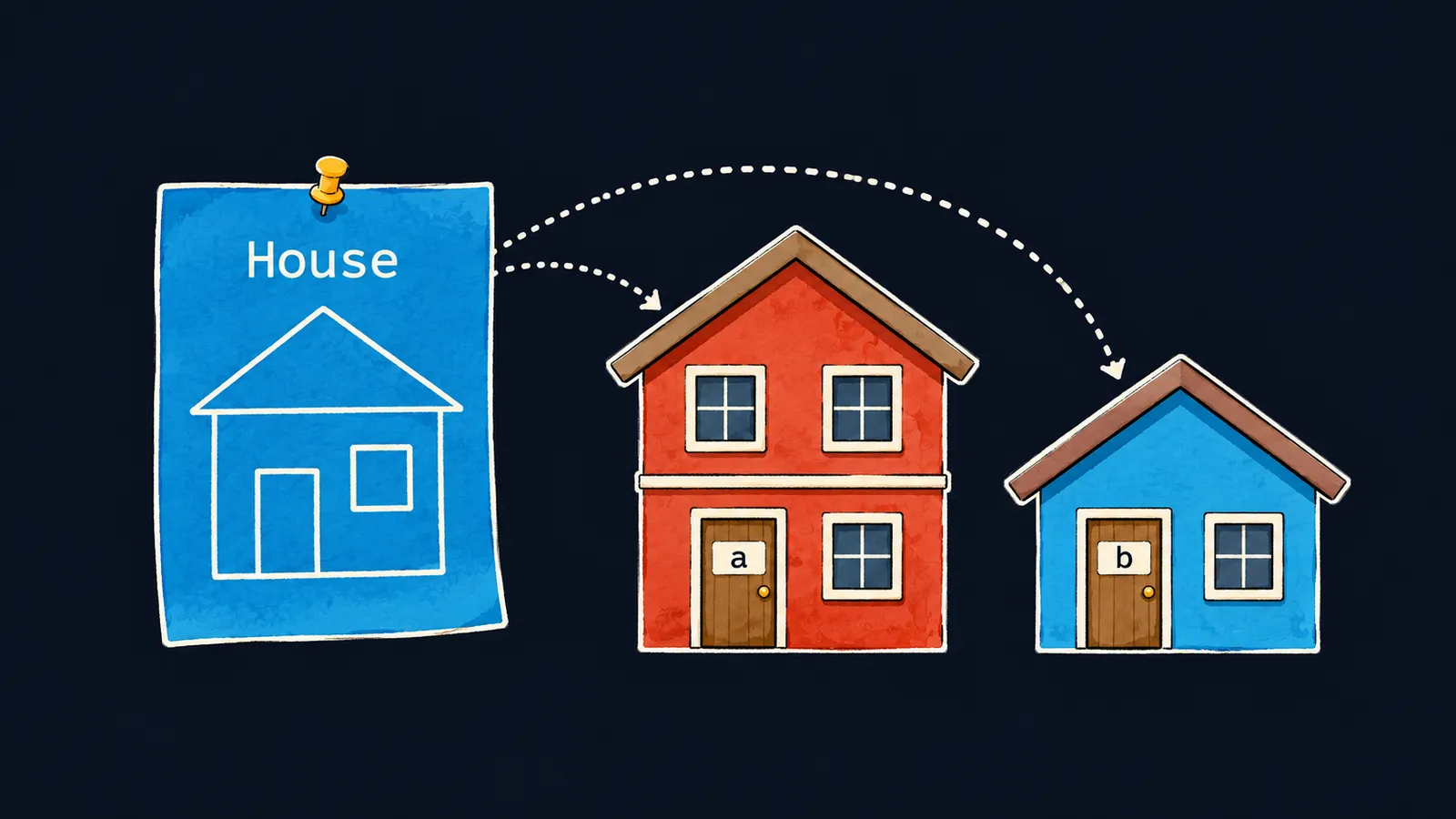
Picture a blueprint of a house. It says that a house has a wall color and a number of floors, but the blueprint itself is not a house: nobody can live in it. One blueprint can be used to build any number of houses. Each house has its own color: one is painted red, another blue, and painting one leaves its neighbor alone.
In C# such a blueprint is called a class. A class describes a new type: what data each of its values holds and what can be done with that data. A house built from the blueprint is an object, that is, one value of this type. An object is also called an instance of the class.
Why do we need a class? Without one, the data of two houses sits in separate variables: color1, floors1, color2, floors2. Nothing in the program says that color1 and floors1 belong to the same house. A class puts a house's data and the actions on it together in one unit:
House a = new House();
a.Color = "red";
a.Floors = 2;
House b = new House();
b.Color = "blue";
b.Floors = 1;
a.Describe(); // red, 2
b.Describe(); // blue, 1

class House
{
    public string Color = "";
    public int Floors;
    public void Describe() => Console.WriteLine(Color + ", " + Floors);
}
Let's go through the program line by line:
class House { … }declares the class: a blueprint that builds no house on its own.public string Color = "";andpublic int Floors;are the data every house will have.public void Describe()is a method of the class: it prints the color and floor count of the house it was called on.House a = new House();builds a house from the blueprint and names ita, andHouse b = new House();builds a second, separate house.a.Color = "red";paints the walls of housea: the dot after a name opens the data of that particular house.a.Describe()printsred, 2, andb.Describe()printsblue, 1. There is one method, but the houses differ.
A class is a type
A class is used the same way as the types int or string. A variable for a house is declared the usual way: the type first, then the name. Remember two things about such a variable:
House a = new House();can be written shorter:var a = new House();. The type is visible on the right.- Like an array variable,
aholds a reference to the object, not the object itself.
Fields
A field is a variable declared inside a class. Each object has its own set of fields: house a has its own Color, and house b has its own. Let's take the declaration public string Color = ""; apart:
publicopens the field to code outside the class, including the top-level statements;stringis the field's type;Coloris the name, capitalized by convention like every open field;= ""is the value the field starts with in every new house.
A field without a starting value gets a default value, like an element of a new array: a number gets 0, a bool gets false. That is why a new house has Floors equal to 0. A string field is given a value right away, at least the empty string "": without it the field holds no string, and the compiler issues warning CS8618.
A field belongs to an object, not to the class. The line House.Color = "red"; does not compile (CS0120): a blueprint has no color, you paint a particular house.
An object's methods
A method declared inside a class is an action every object can perform. It is called with a dot after the object's name and works with that object's fields:
House a = new House();
House b = new House();
a.Paint("red");
b.Paint("blue");
a.Paint("green");
Console.WriteLine(a.Color); // green
Console.WriteLine(b.Color); // blue

class House
{
    public string Color = "";

    public void Paint(string color) => this.Color = color;
}
Let's go through the calls to Paint:
a.Paint("red")runs the method's body for houseaand paints its walls.b.Paint("blue")runs the same body, but now for houseb.a.Paint("green")repaintsa, andbstays blue.
Inside a method, the word this means the object the method was called on. this.Color = color; means the same as Color = color;, and this is usually left out. It is needed when a parameter has the same name as a field: without this, the name would mean the parameter.
A method of a class sees its parameters and the fields of its object, but not the variables of the top-level statements. A method declared right among those statements does see them.
Where a blueprint and a class differ
Builders can depart from the blueprint and add a garage to a house. An object cannot: it has only the fields and methods declared in its class. So a.Garage = true; does not compile (CS1061).
How a class differs from an object
Interviewers often ask this. The answer has two parts:
- a class is the description of a type in code: which fields and methods its objects will have;
- an object is an instance built from the class with
new, with its own values of the fields.
Common mistake
The class was declared at the top of the file, above the statements:
class House
{
    public string Color = "";
}

House a = new House(); // ✗
Console.WriteLine(a.Color);error CS8803: Top-level statements must precede namespace and type declarations.The program does not compile. This is the rule from the theme on the first program: top-level statements come first, and class declarations come after them. The compiler points at the first statement below the class. Move the class to the end of the file.
Key points
- A class is the blueprint of a new type: it declares fields and methods, and objects are built from it with
new. - Each object has its own fields: repainting one house does not change the others.
- A method of a class works with the fields of the object it was called on; inside the method that object is called
this.


